Sierra Foong's Coding Projects
Hi, my name is Sierra. My interests are Maths, coding, and reading. Solving challenging Maths questions, cubing, and coding energize me! As for reading, I love autobiographies and learning cool facts from non-fiction books. Also, one of the best parts of my day is listening to "Mutton’s Useless Facts" on Class 95 while my mum drives me to school.
After my introduction to robotics in Primary 4, I was eager to try something new. During a trial class in the June 2025 holidays, I discovered Python, which sparked my interest in text-based programming languages. Although the coding school mentioned I was too late to participate in the upcoming competitions, I was inspired to continue learning and persuaded my mum to let me join the classes.
I find it incredibly enjoyable to explore and apply what I have learned. Upon completing the basics, I began exploring how to create simple games using Pygame. I even created games for my friends and sister to play and challenge themselves with!
I find it exciting that coding can bring people together and make learning more enjoyable. It is so much fun to improve my programming skills while helping others at the same time!
Students learn a comprehensive set of pygame basics, set up, creating input and text, drawing and moving objects, making pictures, implementing movement to the objects and pictures, transiting between screens, after which, they will develop their game project for their presentation.
Description:
In this project, I created a game called "WhatCountry?" using Pygame. The idea came from my curiosity about the flags of different countries and my love for learning about cultures as a young Singaporean. I wanted to make a game that challenges players to recognize which flag belongs to which country, while also teaching me more about coding and design!
To build this game, I used object-oriented programming (OOP) to organize my code into clear, manageable parts. I created separate classes for the game screen, the flag drawing functions, and even the scoreboard and instructions. It was like building a set of LEGOs—each small block worked on its own, but together they formed a complete and exciting game.
In "WhatCountry?", each turn displays a flag that I draw using simple, solid-color stripes. To make sure even white parts are visible, I outline each flag with a thin black line. I included at least seven different flags, such as those for France, Italy, Germany, Poland, Ukraine, Russia, and Romania. The game then asks a question like, "Is this the flag of France?" If you think the flag is correct, you press Y; if not, you press N. There’s even a timer that adds a bit of excitement, making sure you answer quickly!
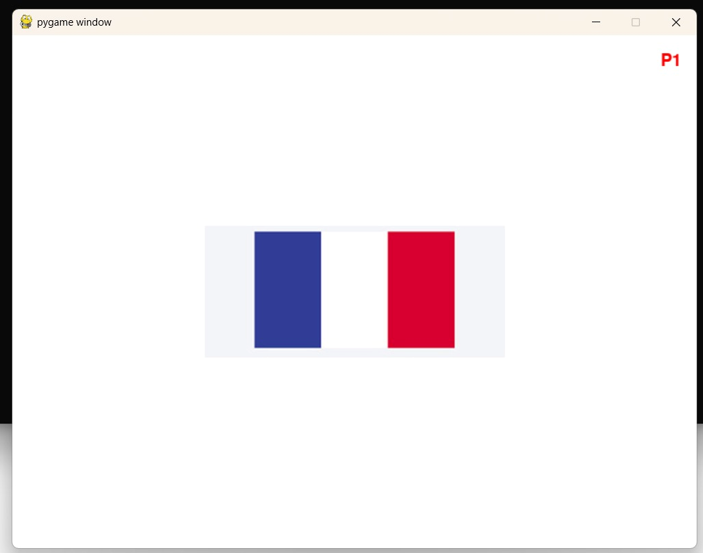
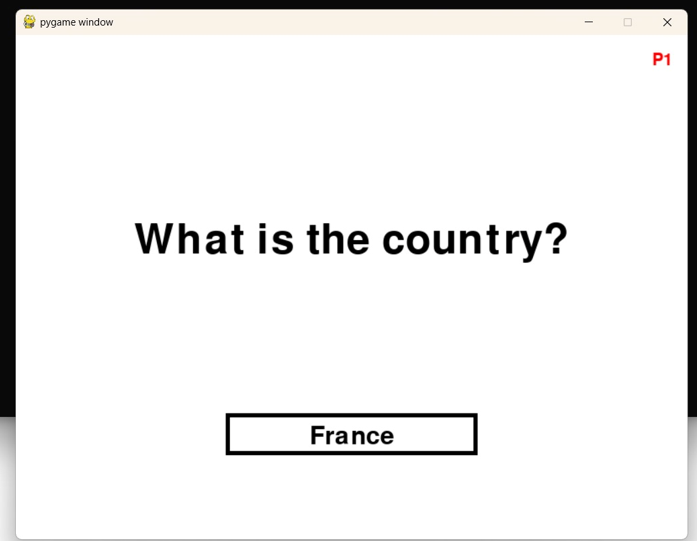
Along the way, I learned how to design user interfaces that display important information like scores, turn numbers, and timers. Handling key presses and events taught me how to make the game interactive and responsive. I enjoyed combining coding with creativity, and it was super fun to see my ideas come to life on the screen.
Overall, "WhatCountry?" is not just a quiz about flags—it’s an adventure that takes you around the world and shows you how programming can be both educational and entertaining. I hope you enjoy playing it as much as I enjoyed making it!
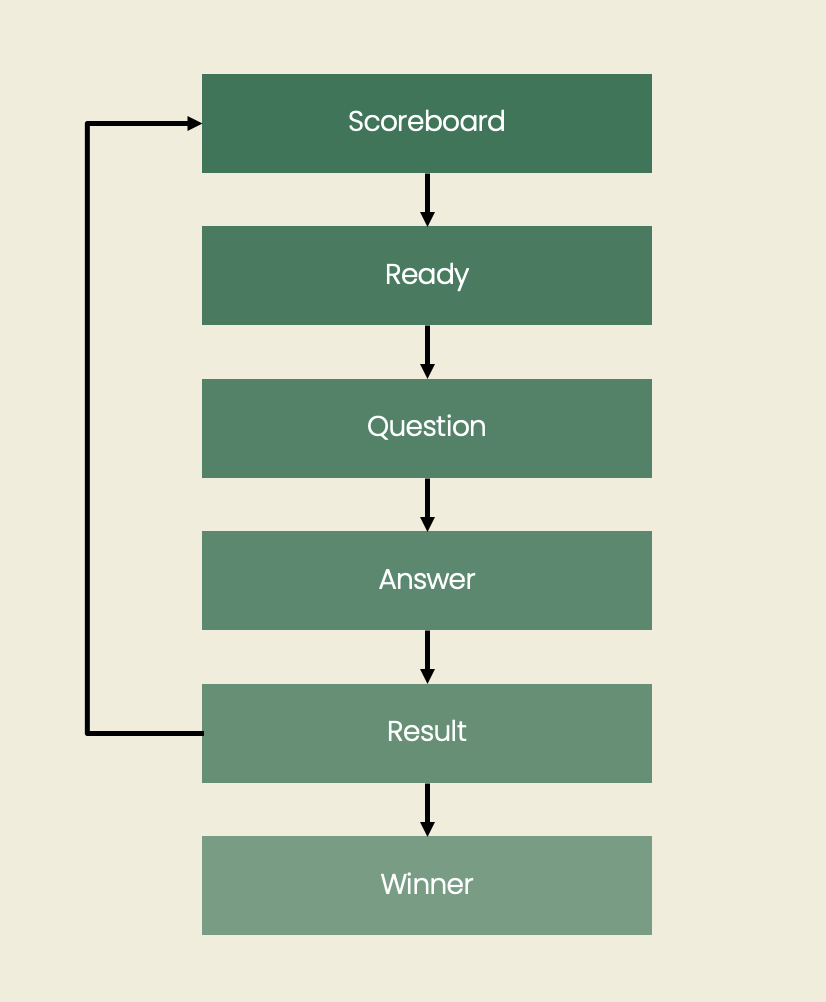
Diagram:
Trinket:
Description:
In this project, I created a Pygame-based multiplication game designed to
make learning times tables more fun and interactive. The idea came when I
saw my sister struggling to memorise her multiplication tables, and I
wanted to build something meaningful that could help her improve while
enjoying the learning process.
The goal of this project was to design an engaging game that helps
children practice multiplication in a way that feels exciting rather than
repetitive. By turning practice into a game, players can improve their
mental calculation skills more naturally.
To build this game, I used
object-oriented programming (OOP)
to organise my code into clear and manageable parts. I created separate
classes for components such as the game screen, scoreboard, instructions,
and drawing elements. This modular approach made development easier and
more structured, like building with LEGO blocks where each part fits
together to form the complete game.
The final game allows players to choose different difficulty levels based
on their ability. Each level changes the timing and complexity of the
multiplication questions. Players must answer correctly within a time
limit to progress, adding excitement and challenge to the gameplay.
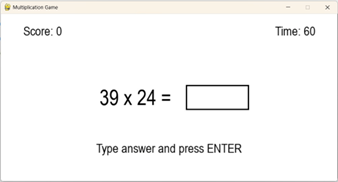
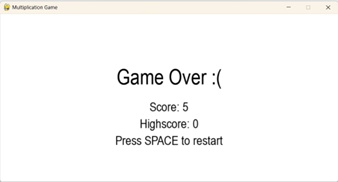
The game also includes useful features such as a scoring system, timers, and interactive controls. Important information like scores, turns, and remaining time is clearly displayed, making the experience easy to follow and user-friendly. Players can even compete with friends to achieve higher scores while improving their math skills.
Through this project, I learned how to design user interfaces, handle key presses and events, and create interactive gameplay using Pygame. It was rewarding to see my ideas come to life, and even more encouraging to see my sister improve in her mental calculations. This project showed me how coding can be used to create fun and impactful learning tools.
Trinket:
Touch Activated Bumper Car
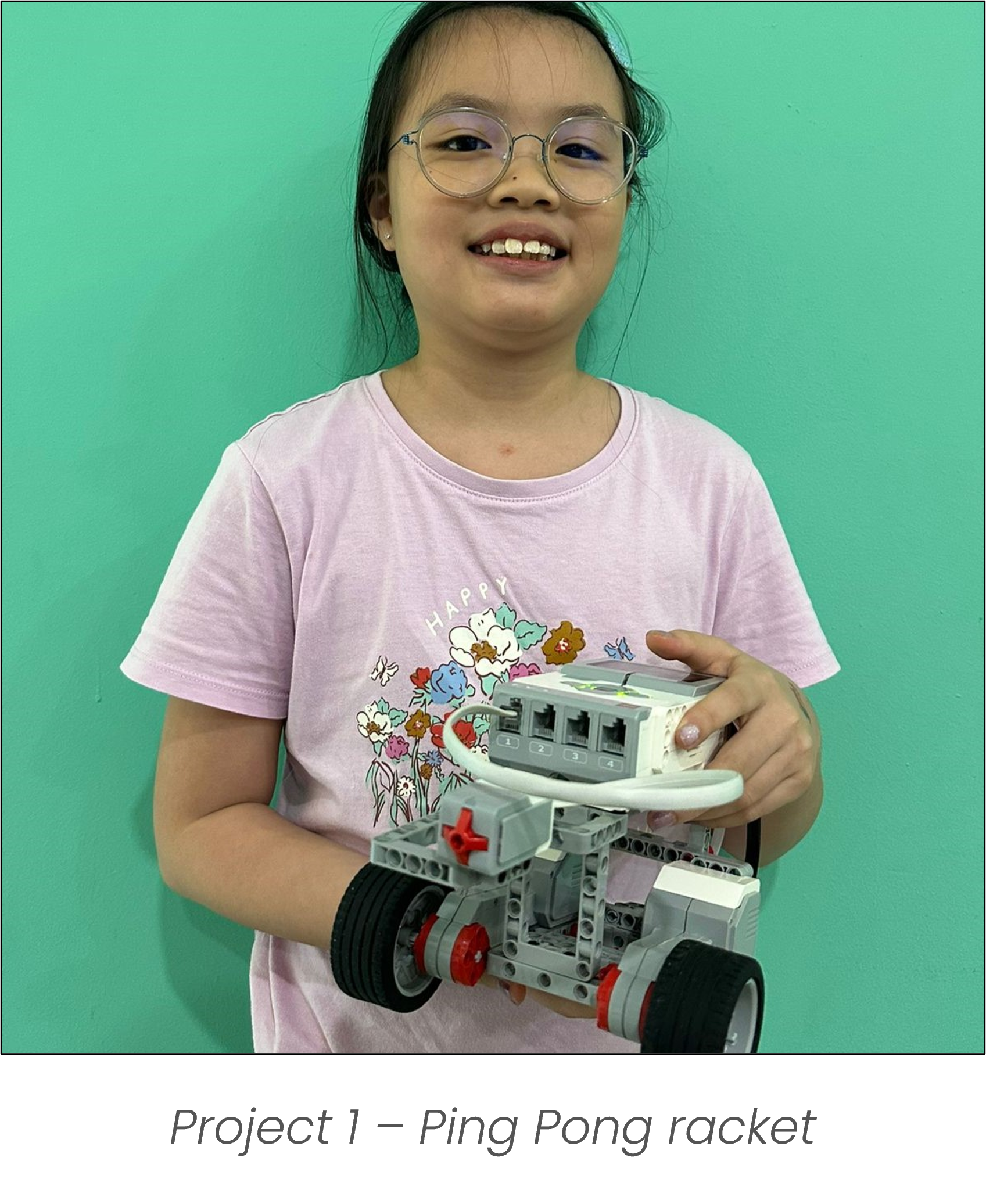
I learnt how to use the LEGO technic parts to create different designs. By applying coding concepts such as conditionals (if-else) and integrating various sensors, I programmed my creations to respond dynamically to their environment. One example was a bumper car that automatically reverses when its front touch sensor detects a collision—mimicking real-world applications of obstacle detection used in autonomous vehicles and robotic systems to enhance safety and navigation.
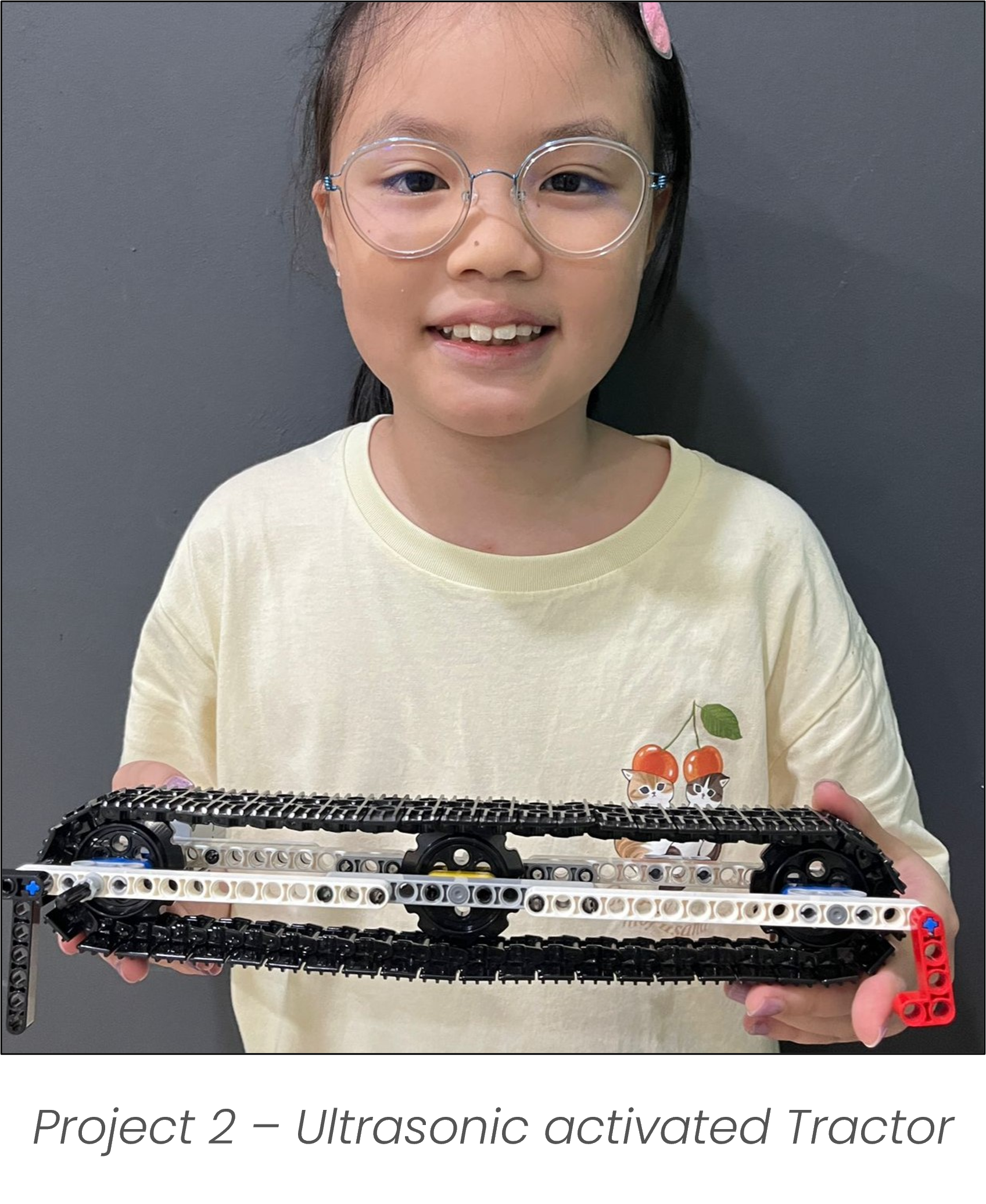
Colour Activated Sushi Belt
By applying coding concepts such as conditionals (if-else) and incorporating different sensors, I built a sushi conveyor belt system that automatically stops when a specific color is detected. This mimics the function of an emergency stop button, commonly found in industrial automation and manufacturing environments, where color or visual sensors are used to trigger safety protocols or halt operations in response to potential hazards
Description:
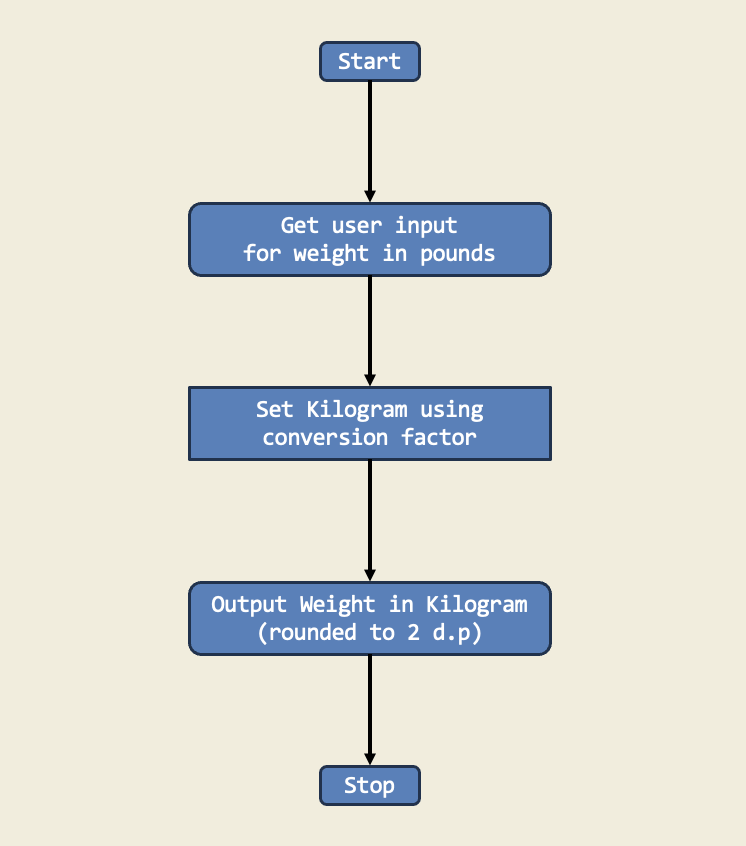
In this project, I learned how to convert weight from pounds to kilograms by multiplying by a conversion factor. This is important because it teaches us how to change one unit of measurement to another so we can compare different types of data.
Diagram:
Trinket:
Description:
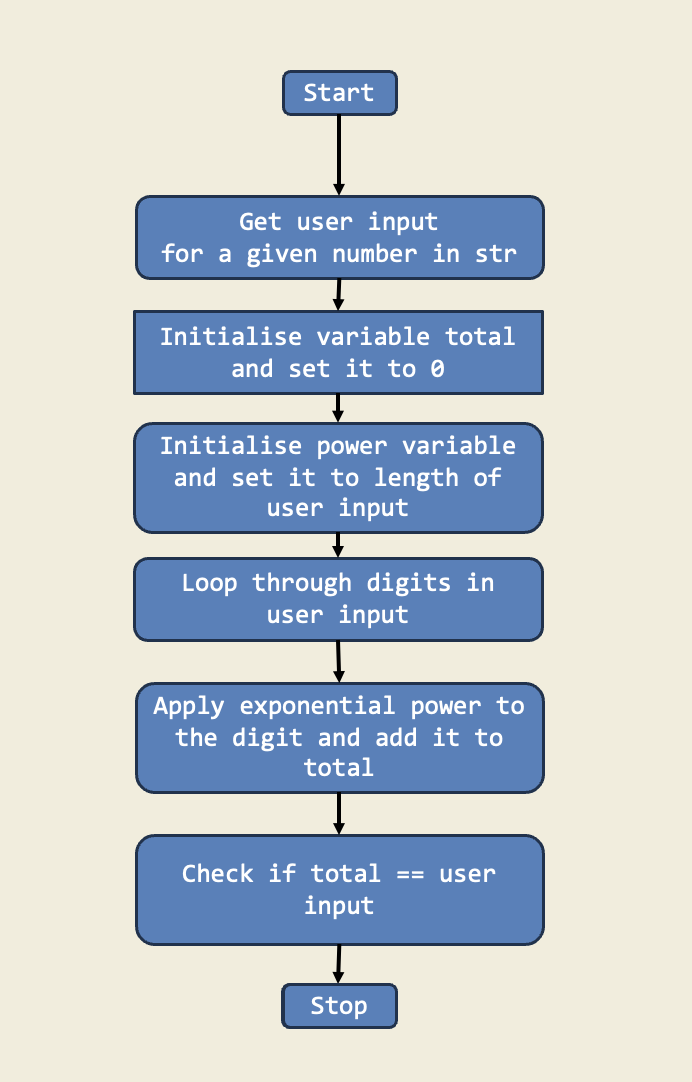
I have implemented a Python script named armstrong_no_checker to check if a given number is an Armstrong number. An Armstrong number for a 3-digit number is a number that is equals to the sum of the cubes of its digits. For example, 153 is an Armstrong number because 1^3 + 5^3 + 3^3 = 153. This project demonstrates the use of functions, loops, and conditionals in Python to solve mathematical problems. The script prompts the user to enter a number and checks if it is an Armstrong number by calculating the sum of the cubes of its digits and comparing it to the original number.
Diagram:
Trinket:
Students learn to use list, for loops and range to iterate over multiple sequences. This includes datatypes in a list, empty list, list methods, growing a list, accessing list elements with positive and negative index, modifying list, for loops with range, loop control with break and continue.
Description:
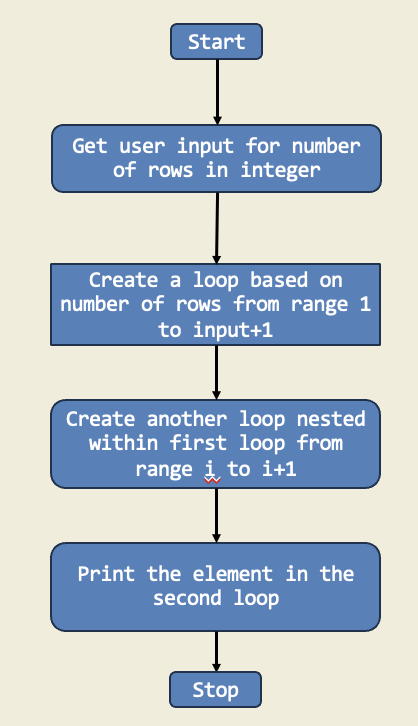
In this project, I created a number pyramid using nested for loops. The outer loop controls the number of rows, while the inner loop prints the numbers in each row. This project demonstrates how to use loops to create patterns and shapes in Python.
Diagram:
Trinket:
Description:
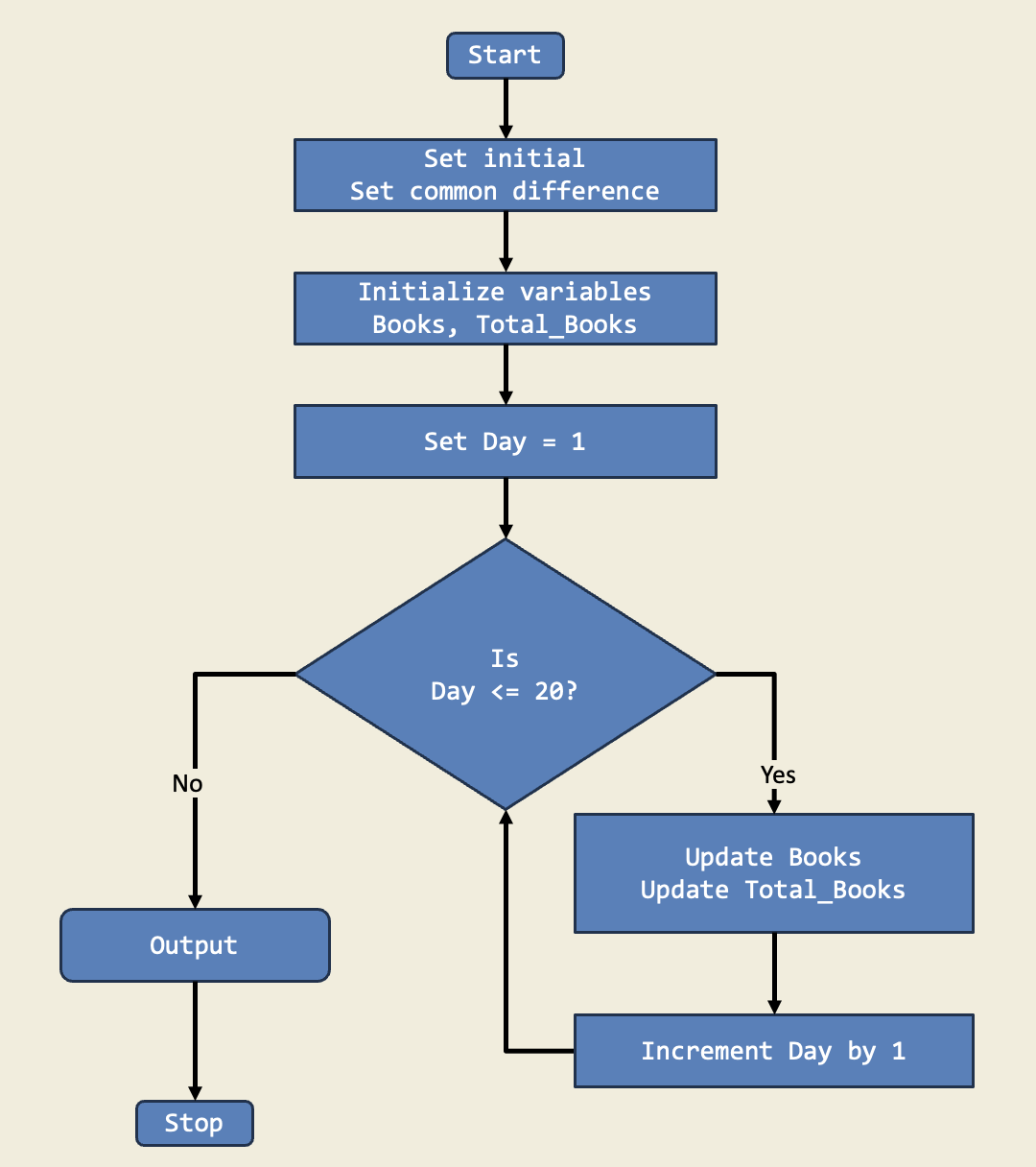
In this project, I managed an imaginary library's inventory using a for loop to calculate the number of books on day 20 and the total after 20 days. This project shows how for loops make it easy to perform repetitive tasks.
Diagram:
Trinket:
Students learn how to build control flow into the python code by including if, else, and elif statements. This includes boolean expressions and variables, relational operators (equals and not equals), boolean operators (and, or, not), if, else and elif statements.
Description:
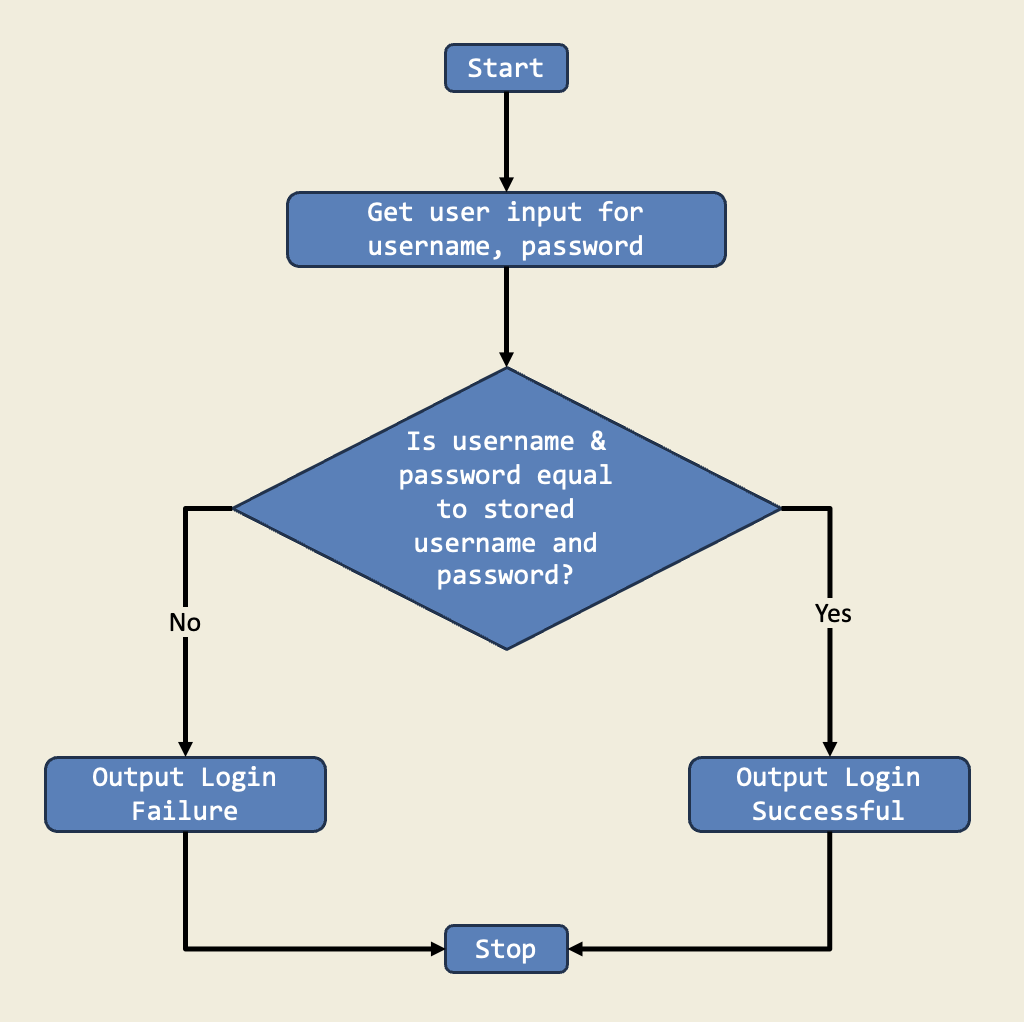
This project is a simple login system that checks if the entered username and password match preset values. If they do, the user is logged in; otherwise, they must try again. It demonstrates how if-else statements handle multiple outcomes based on user input.
Diagram:
Trinket:
Description:
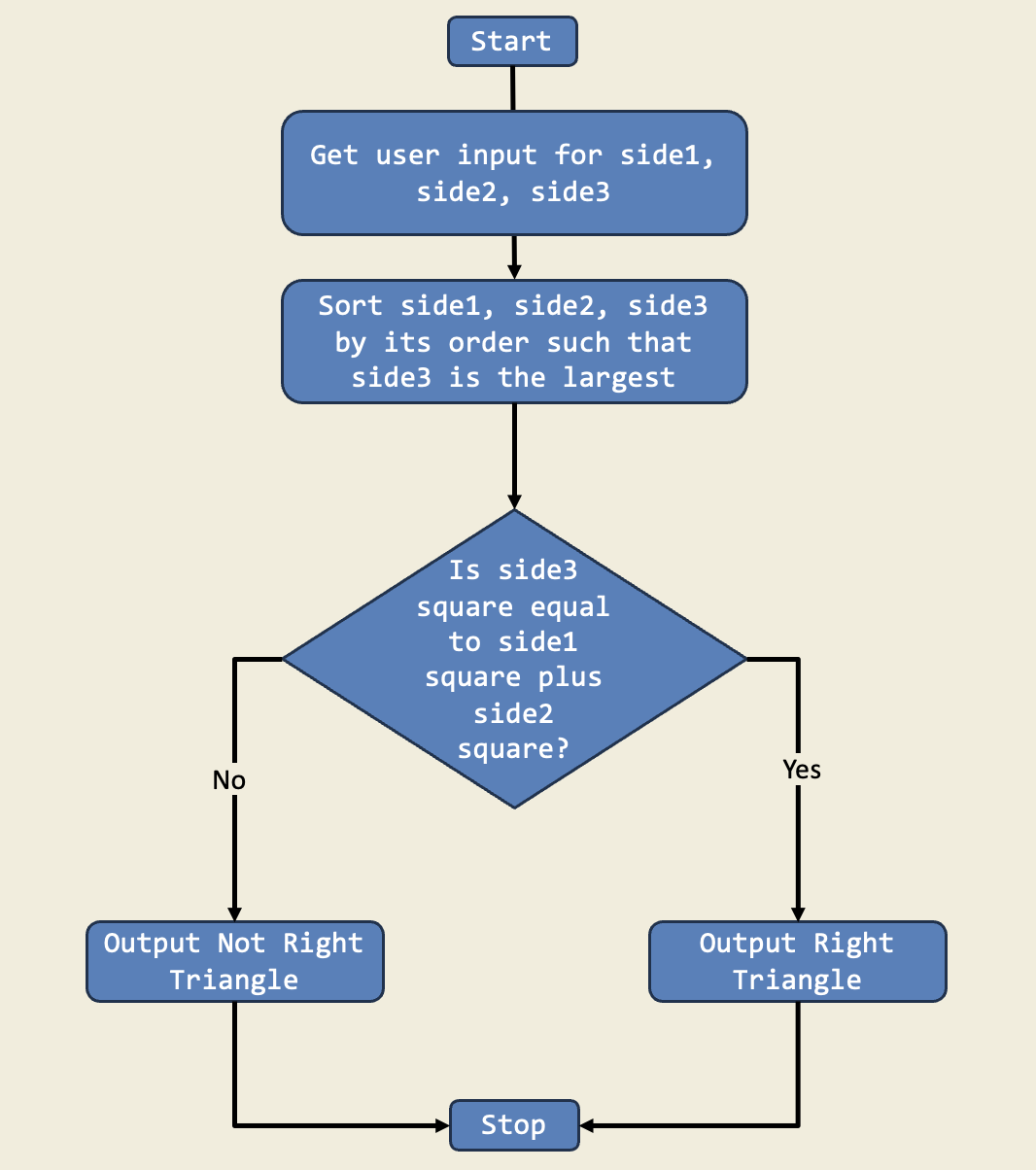
In this project, I used if-else statements to check if a triangle is right-angled. I asked for three sides, sorted them, and used the Pythagorean theorem to decide if the triangle was right. This is important because if-else lets the program choose different actions based on the input.
Diagram:
Trinket:
Description:
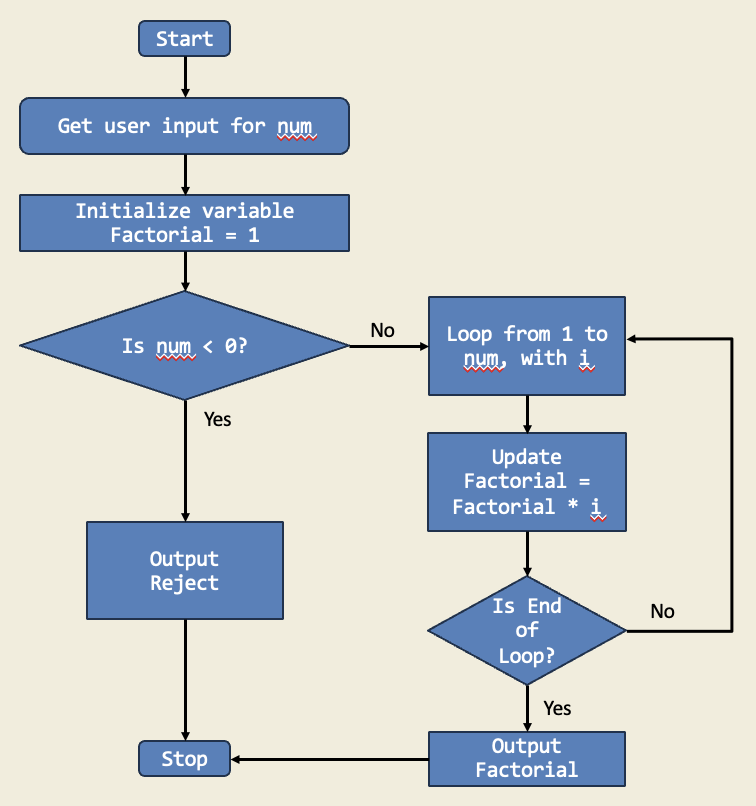
I organized a math competition among my friends, and one of the challenges involved calculating the factorial of a given number. I created a Python script that took a user input and calculated the factorial of the given number.
Diagram:
Trinket:
Description:
I created this project when I was bored at home and decided to try making something on Scratch. I heard about Scratch when my friends talked about it in school. They way they talked about it made it seem very exciting, so I tried making an animation. It turned out to be extremely fun, and I loved making this animation!
Scratch Project:
Students are introduced to the concept of while loops, double while loops, using while loops to create multiplication tables and solving math projects with while loops.
Description:
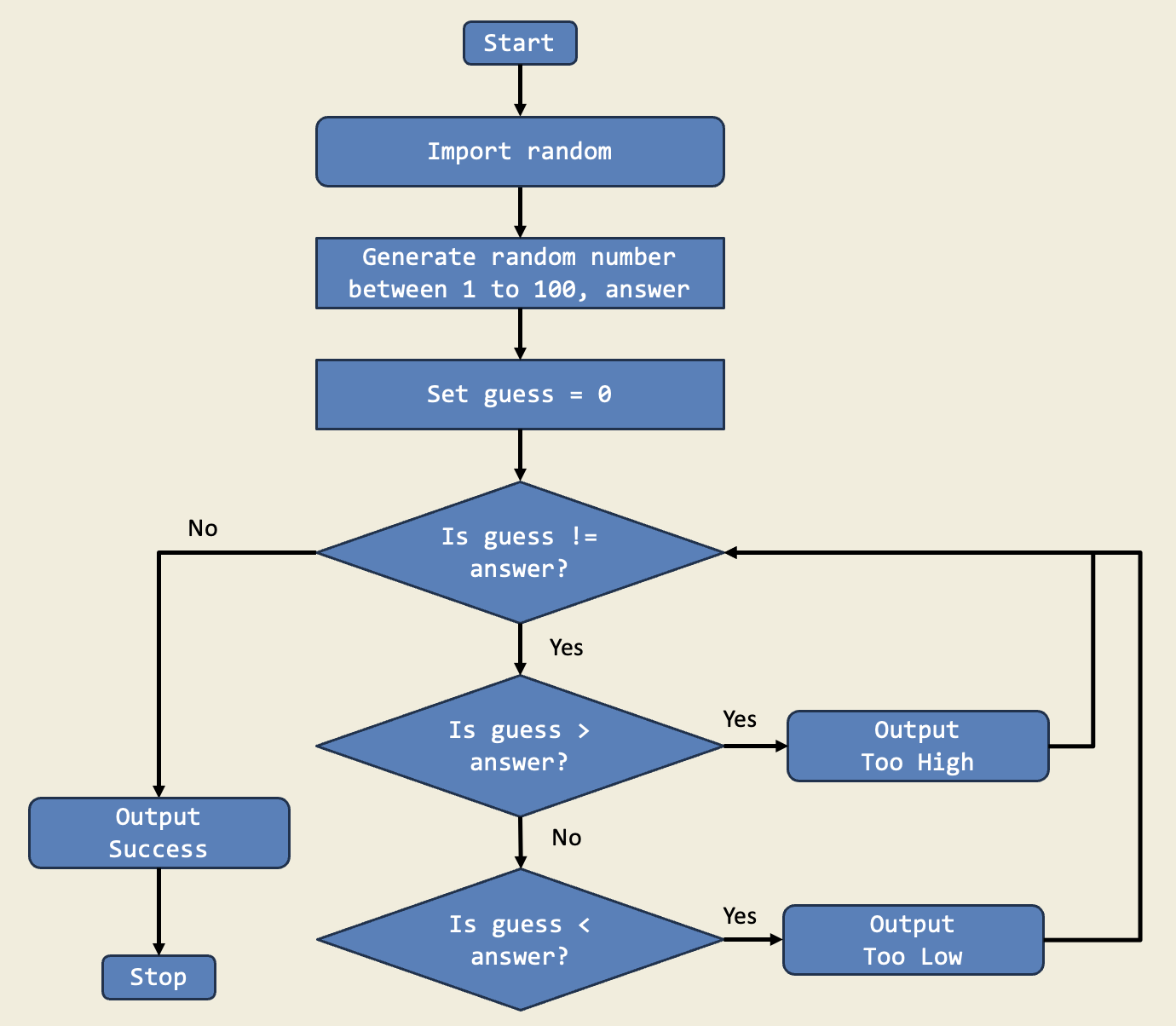
In this project, I built a guessing game using a while loop that keeps asking for a guess until the answer is right. The game tells me if my guess is too high or too low. This is important because while loops let me repeat actions until a condition is met, which is perfect for games.
Diagram:
Trinket:
Description:
I have created a Python program named my_multiplication_table.py that takes an integer input from me. It generates the multiplication table of the entered number using a while loop.
Diagram: